
Tax-Ready Records in Three Taps.
Capture the Cost
As soon as you pay a bill, log the details in your dashboard. PropertyNow automatically imports your subscription fees and orders, so you’re already halfway done.Attach the Proof
Snap a photo of your receipt or drag and drop a PDF directly into the expense record. We store your digital evidence securely, so you can toss the paper copy for good.Categorize & Relax
Select from a pre-set list of ATO-compliant categories—from Land Tax to Repairs. Your data flows instantly into your EOFY reports, ready for your accountant.ATO ready categories out of the box.
Don’t guess what you can claim. Our platform uses a curated list of official ATO expense categories, ensuring your records are structured correctly from day one. Whether it’s Body Corporate fees or Capital Works, your data is organized exactly how your accountant needs to see it.
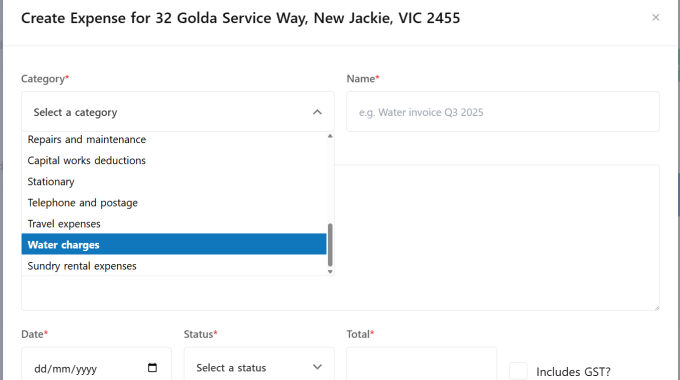
Find exactly what you need, instantly
Skip the manual sorting. With powerful built-in filters, you can isolate expenses by category or financial year in a single click. Whether you’re checking your total maintenance spend or pulling records for a specific tax year, the information you need is always at your fingertips.
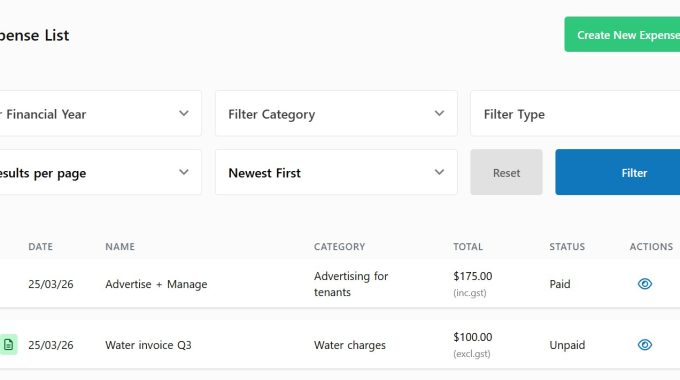
Secure digital receipt storage.
A lost receipt is a lost deduction. Every expense you log includes the ability to upload multiple photos or documents. By digitizing your records as you go, you build a permanent, searchable archive that won’t fade or get lost in a drawer.
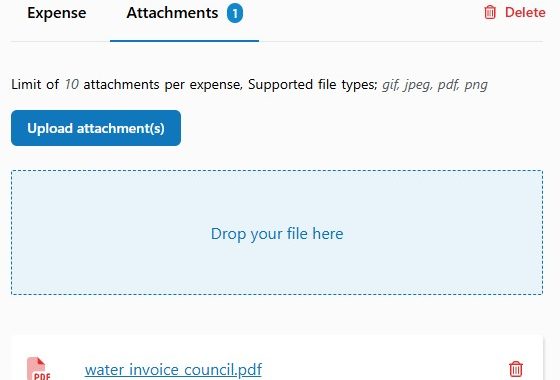
Everything you need for a stress free tax return

Financial Year Sorting
Isolate your records by specific financial years to make June 30 reporting a breeze.

GST Toggle Tracking
Easily flag expenses as GST-inclusive to keep your gross and net totals perfectly accurate.

Bulk Receipt Uploads
Attach multiple photos or PDFs to a single expense record for comprehensive digital proof.

Multi-Category Filtering
Add, edit, or delete expenses at any time to ensure your historical data is 100% correct.

Multi-Category Filtering
Drill down into specific spending areas—like repairs or rates—to monitor your property’s performance.